Kayla Outline Font Review
As a web designer, I’m always on the lookout for fonts that bring personality and visual interest to digital projects without sacrificing usability. Kayla Outline has quickly become one of my go-to choices for adding a touch of warmth and charm to website headers, hero sections, and branded elements. Its handwritten style feels personal and inviting, making it perfect for creative businesses looking to stand out online.
A Warm, Handwritten Touch for Web Design
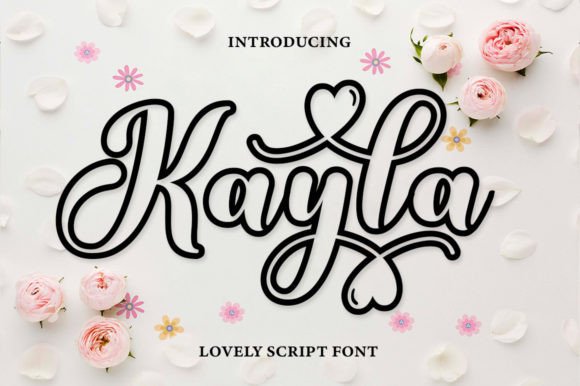
Kayla Outline is a premium font that blends the natural flow of handwriting with the consistency needed for digital design. Its soft curves and gentle swashes give it a romantic, jovial vibe that works well for brands focused on lifestyle, wellness, or creative services. I’ve used it in a few recent projects, and it never fails to add a sense of approachability and authenticity.
One of the first places I tested it was on a boutique online store’s hero section. The font looked great over a background image of handmade products, creating a cozy, curated feel. It paired beautifully with a clean sans serif for body text, giving the page a balanced look that felt both modern and personal.
Perfect for Headers, CTAs, and Branding Elements
Kayla Outline shines when used as a display font for headlines, call-to-action buttons, and logo text. Its flexibility allows it to work in a variety of sizes, from large banner titles to smaller decorative accents. I’ve seen it used effectively in portfolio websites, coaching landing pages, and course sales pages where a friendly, expressive tone is important.
On mobile devices, the font remains legible and doesn’t lose its character. It’s ideal for short phrases like “Welcome to My Studio” or “Join the Journey,” which are common in hero sections and landing pages. The font’s weight and spacing make it easy to read even on smaller screens, ensuring your message still comes through clearly.
Pairing Tips for Web Projects
When using Kayla Outline in web design, I recommend pairing it with a simple, readable font for body copy. A clean sans serif like Open Sans or Lato works well, as it provides contrast without overwhelming the design. For editorial-style sites, a classic serif font like Georgia or Playfair Display can add an elegant touch while keeping the overall layout cohesive.
I also found that using Kayla Outline for buttons and CTA elements adds a playful yet professional edge. It’s especially effective when placed over dark backgrounds or image overlays, where its subtle texture stands out without competing with the main content.
Usability Considerations for Digital Design
While Kayla Outline is a beautiful choice for display purposes, it’s not ideal for long paragraphs or dense text blocks. As a web designer, I always remind clients that decorative fonts should be used sparingly. They work best for headings, subheadings, and short phrases rather than body text.
For accessibility, I recommend using it only in areas where it enhances the visual hierarchy, such as headlines or brand elements. If you’re designing for users who rely on screen readers or need high contrast, stick to more traditional fonts for critical information.
Real-World Applications in Web Design
I’ve used Kayla Outline in a few different contexts, including a blog redesign for a lifestyle brand and a product landing page for a digital course. In both cases, the font added a sense of warmth that aligned with the brand’s identity. It helped create a more engaging experience by making the content feel less formal and more relatable.
Another project involved a promotional landing page for a seasonal collection. Using Kayla Outline for the headline and supporting text gave the page a festive, handmade feel that matched the product’s aesthetic. It worked well alongside illustrations and vibrant colors, reinforcing the brand’s creative energy.
Font Licensing and File Formats
Before using any font in a web project, it’s important to check the licensing terms. Kayla Outline is available in multiple file formats, including WOFF and TTF, which are compatible with most web platforms. For commercial use, ensure the license covers website deployment, especially if you're working on client projects or selling digital assets.
It’s also worth noting that some versions of the font include alternate characters and ligatures, which can be useful for customizing the look of your design. These features allow for more flexibility when creating unique branding elements or custom graphics.
Final Thoughts on Kayla Outline
Kayla Outline is a versatile and expressive font that brings a human touch to digital design. Whether you’re building a portfolio site, launching a new product, or updating a brand’s online presence, this font can help elevate your visual storytelling. Its warm, romantic style makes it ideal for creative businesses looking to connect with their audience on a more personal level.
As with any typeface, the key to success lies in thoughtful application. Use Kayla Outline where it adds value—like headers, CTAs, and branding elements—and pair it with complementary fonts for balance. With the right approach, it can transform your website into a more engaging and memorable experience for visitors.